Description
With this extension, your users will be able to redeem items with there points, from VRFlad’s Point System.
Import Code
TlM0RR+LCAAAAAAABADFVllz4jgQft+q/Q9enscp+eDQvAUngElCwmUTL/ugy8ciH+sDYqbmv69sYBJDMjWzNVVLYYz0tb7u/tyW+svvv0lSa8vSLIij1mdJ+VRPRChkYtRqHYaI5ALOxMyf1ViSvhxuAgpoZdftYJfiniYjDNuy3qMdGbahIqsugEzXYQdi7cBVL/qnYEXFHxWcv86yCGHOKr48Ldjr/CmYGaOMhXaQ+09xEOXZG0IvjYuksunHuZSco4jvUJnNiipBF/HsDXeKIhqH13V+lyiJI1KkKYvyS+xCk4Yu3w3c8BnZvMZX21KWkTRIjnG0ztANY8k1D7bsIo5DFsxlIkrCzsKpQePzem0HIs1dtl4/BCSNs9jNrya3i/V6kIoQd3G66ejr9Va/Alca0BS4XocZiVMe4CvKeest4V9Nz7jMmRHTOk26miQ4JN5S43s6tPLHHbi7mSY7ao8zZD94z+qLT7QHb6r0zbndFnNtLvDuzTT2TOPaIyMrwEP+tzkcb7G682Yrnz9rFnDmXnKyYYKzuh+uvvq8Mj3hl5PgGprDQeloE2xG1t5ZmcFq3l5iZQJIyAun9JLH5toER1OPhNbGsa18qsI9NQTH7WSLI4eTaFpYQzgWNvuHwPdJSPd2OS4de8YdW7nB2gSYHFQ2CzoaV3nHd/NNlcvYWDk+Cfon28dnW+HmDfCeV+OIKFlw8rkIB7kzH9N7PtsutVkp9IjujM03PepryAtq9BWiWuVyCEXMs33FVWl4v6GcDqpcx7bQoSfWg6fAr23vjeuAnOyDC87QNPxmLjf6QUfe31Y8pNx49yV8xNrUm9ntLbVpbA6OWFPHJvdh7mZ56xVL1SqcW4UTbeI76lIIM+7WPiLgMRsq5nC2NYeC2+jHzyuHm0OrwJoVIaO/w6rIe/TgOSEszdFM4NPCHPAtnfcLod3GHOWN+N15P6Cr6ZEXFni08dBwoDrzfreRlwaCu0U2MYLrZsyjMacjq8RBP3y2X/bOmY07beTM8WjCTaO3tYZ+Qsp+dS3RcOktj8+2ocnoHX+3k+ncaC8cu71Z2NaeqINI1PnGjPL6+Yl8TvlxR2jcqJkVOOpyocH0qNv7OR5qqXBW9GTnPc3PassAzXfi5juxr2ZWtdYKB+XdqH7nMtMYn55dcN/0lYnnWFJ7efYeHi7hE9DVuDjaNGtqBI4x9KHYL+DZ3pikjMRhEvAPNkfKOCrnOUovN/E3JxhhCu6qGMh6twvFj6vJGDBdVjqKSoGqKq6mnTnescDzK1JwBZpIXiZVMLD6NJFvB9UZ1wdn3yHAiLIXgaivs18/fXTmbFEaVFST49mT1mePEWf5mcct4vUZ3AbgPT1UCt0e6SK514a6rBOgyphqiuy2FaXjuhruoO7P6qGo2vtqNPqAH9YD/Hc96tH7erRuX1CY8HP42Of0VAgRES2OuAtVekTGuuvKTNUU0AG4Q1T0P6ui/IgqOXupQmot/CCTxBdF0jFt6dgLXbxjosMQ2l0TEhd1O/Ru1XSI1gFtzZUhdBVZbytQ7mnElVEHQkJ6lOgK/Wl9wK+UR/+xojnWwhNHhElLsTaVaq2MOAxFOyjtfJRLZVxIOyRGeSz5KElY9Me7VcMYUUFH78kAU7HBIBfKuKMgGbQh0qCLKFbJz6sCfuHWor1R5fT3tdM79rrDykHdYb6BSMw5SjJG36AHsCY6WB4a/hP49V/xVrQWdQwAAA==
Installation
In Streamer.bot in select Import from the top left.
Copy the Import Code and paste it into the Import String.
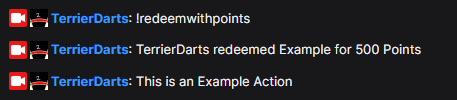
Once you’ve imported the code you will need to set up a command to trigger this. In the example I use !redeemWithPoints but I would recommend using the name of the redeem.
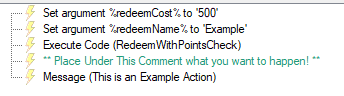
You can change redeemCost & redeemName to match what you need them to be. Then to add the action just place all the sub-actions you need below the green comment.
Using a Single Command Idea
Something you could do is have a !redeemWithPoints command tied to an action which checks the input then runs the action based off that input. To set something like this up you would need to have an action which says.
if `rawInput` is equal to `Example1` then do `Example1Action` and 'Break'
if `rawInput` is equal to `Example2` then do `Example2Action` and 'Break'