Counter-Strike Events for Streamer.bot adds custom Counter-Strike triggers to Streamer.bot. You will be able to have triggers fire when you get kills or get killed, when rounds start or end, when you get an MVP or that sick quad kill. Actions are also included which will help you save and play replays (additional free plugins required).
Possibilities
- Automatically capture Instant replays of your kills and play them when you die or when the round is over.
- Automatically record all your kills, or maybe only if you get a double kill, triple kill, quad kill or ace.
- Automatically create vertical clips ready to upload to TikTok, Instagram, Twitch or YouTube?
- Automatically send a message to chat when e.g. round 8 is over or in halftime?
- Automatically send a message with match result and statistics to Discord when the game is over
- Automatically play a fart sound when you take damage
- Automatically play sad violin sound when you lose a round
- Automatically play custom MVP music when you get MVP
- You decide whats possible!
This extension will NOT get your account VAC banned.
Using Counter-Strike’s Game State Integration is not punishable by VAC. This is the same method which gaming peripheral manufacturers can use to change the RGB on your keyboard or mouse depending on in-game events. You are just recieving very limited game data from the game and can not send any data back to the game.
Purchase options
| Option | Price |
|---|---|
| Counter-Strike Events for Streamer.bot with Setup Support | €100 |
| Counter-Strike Events for Streamer.bot without Setup Support | €75 |
| Counter-Strike Events for Streamer.bot Setup Support Only | €35 |
Download File
Installation
In Streamer.bot click the Import button in the top menu. Drag the .sb file into the Import String field.
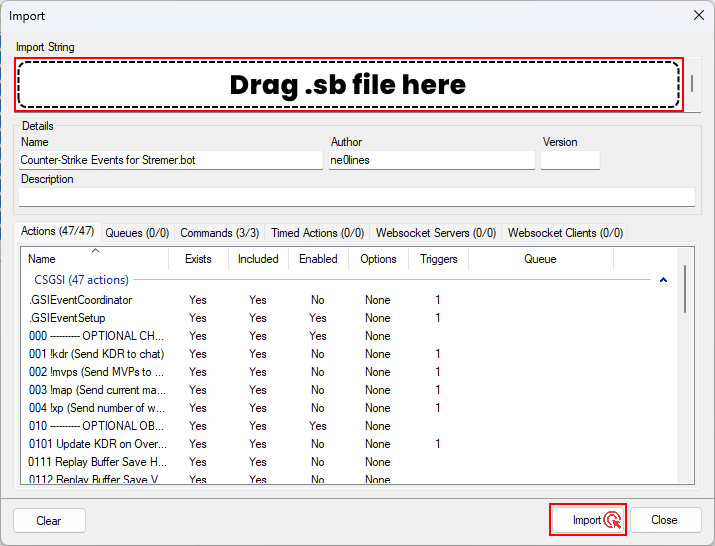
Setup Counter-Strike Game State Integration
In order for Streamer.bot to be able to recieve data from Counter-Strike you need to setup a gamestate_integration_streamerbot.cfg file in your Counter-Strike directory (see location below) if there isn’t one already. This config tells Counter-Strike to send live game updates to the specified gsiUri. Note that the last forward slash in the URI is required.
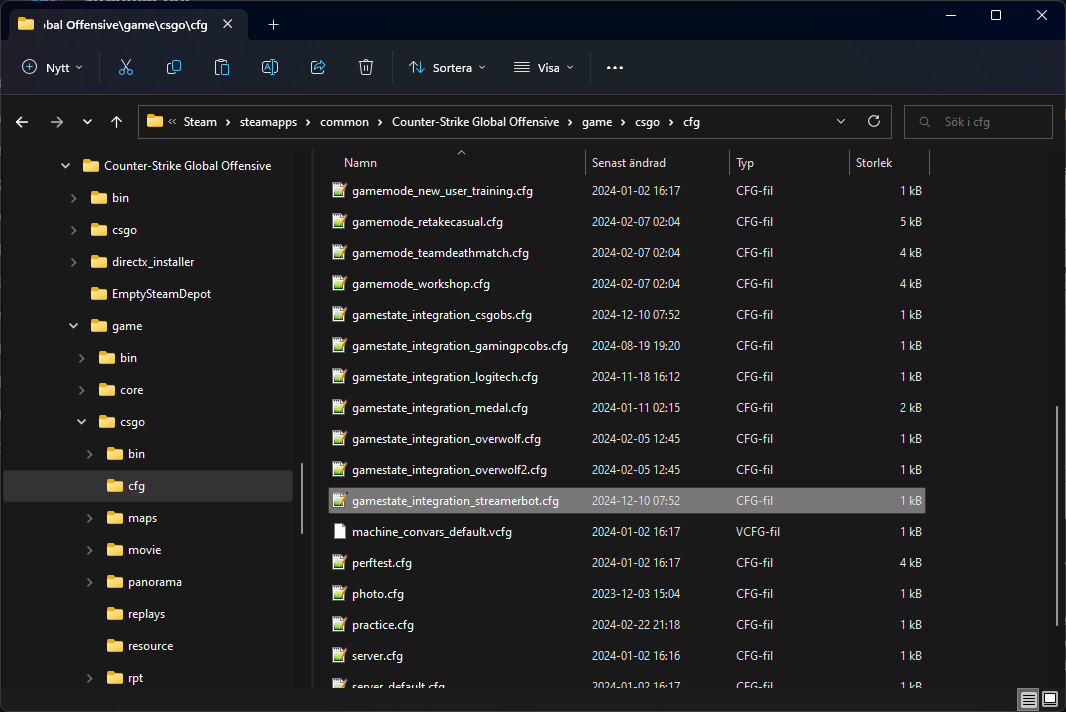
D:\Steam\steamapps\common\Counter-Strike Global Offensive\game\csgo\cfg\gamestate_integration_streamerbot.cfg
gamestate_integration_streamerbot.cfg
"StreamerBotGSI"
{
	"uri" "http://127.0.0.1:3000/"
	"timeout" "5.0"
	"buffer"  "0.1"
	"throttle" "0.1"
	"heartbeat" "30.0"
	"data"
	{
		"provider"			"1"
		"player_id"			"1"
		"map"				"1"
		"round"			"1"
		"player_state"		"1"
		"player_match_stats"	"1"
		"map_round_wins"		"1"
	}
}
Configuration
After the extension is imported to Streamer.bot and you have setup the gamestate_integration_streamerbot.cfg file, copy the URI you set in the .cfg file. Then restart Streamer.bot and the setup process with initiate automatically after a few seconds. Note that the last forward slash in the URI is required both in the .cfg-file and when you enter the URI in Streamer.bot.
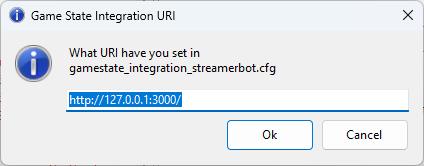
Here you will be prompten about the uri you set in the .cfg file. Just paste the uri and click “Ok”.
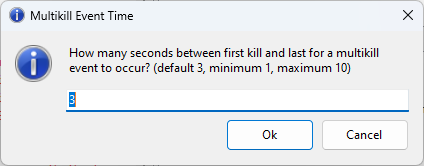
Then you will be prompted on how many seconds between first kill and last to trigger multikill event? (default 3, minimum 1, maximum 10) Enter the amount of seconds you prefer and click “Ok”.
Congratulations!
Setup is now done and you will need to restart Streamer.bot for the last time to have the extension to work properly. You are now ready to play the game as usual, but with Streamer.bot as your Wingman.
Triggers
| Trigger | Description | Suggested usecase |
|---|---|---|
| Match Start | Triggers when match starts | Change scene from Just-Chatting-scene to In-Game scene |
| Match Halftime | Triggers after round 12 in MR12 and round 6 in MR6 | Take a second to thank your sponsors |
| Match Over | Triggers when match is over | Change scene from In-Game scene to Just-Chatting-scene |
| Match Warmup | Triggers when warmup starts | Start a prediction for the game |
| Match Intermission | Triggers during halftime | Send Toast Notification reminding you to posture check yourself |
| Match Result Win | Triggers on Match win | Play a happy song to celebrate the win, also resolve prediction |
| Match Result Loss | Triggers on Match loss | Play a sad song, also resolve prediction |
| Map Changed | Triggers when map is changed | Send a message to chat saying what map you’ll be playing |
| Round Start | Triggers when Round starts | Play 5 second motivational sound |
| Round Over | Triggers when Round is over | Send a message to chat saying “Who wants me to coach them?” |
| Round Freezetime | Triggers during timeouts | Send a message to chat asking for strats to help you win |
| Round Result Win | Triggers on Round Win | Send a message to chat asking for tips |
| Round Result Loss | Triggers on Round Loss | Send a message to chat that the opponents are cheating |
| Bomb Planted | Triggers when the bomb has been planted | Set your RGB strips to flashing red |
| Bomb Exploded | Triggers when the bomb has exploded | Set your RGB strips to fireball mode |
| Bomb Defused | Triggers when the bomb has been defused | Set your RGB strips “CT-blue” if you are CT |
| Player Took Damage | Triggers when you take damage | Play an “ouch” sound |
| Player Death | Triggers when you get killed | Send message to chat saying “They’re cheating!” |
| Player MVP | Triggers when you get MVP | Use “Create clip” action to clip that round |
| Kill (Instant event) | Triggers when you kill an opponent, isHeadshot bool available | Send a message to chat saying "Can you believe how good I am? |
| Double Kill (Instant event) | Triggers when you kill two opponents within 3 seconds | “Load” Replay Source, Create clip |
| Triple Kill (Instant event) | Triggers when you kill three opponents within 3 seconds | “Load” Replay Source, Create clip |
| Quad Kill (Instant event) | Triggers when you kill four opponents within 3 seconds | “Load” Replay Source, Create clip |
| Ace (Instant event) | Triggers when you kill all five opponents within 3 seconds | “Load” Replay Source, Create clip |
| 2K (After round over) | Triggers in the end of the round when you’ve killed two opponents | Save Replay Buffer, Create clip |
| 3K (After round over) | Triggers in the end of the round when you’ve killed three opponents | Save Replay Buffer, Create clip |
| 4K (After round over) | Triggers in the end of the round when you’ve killed four opponents | Save Replay Buffer, Create clip |
| Ace (After round over) | Triggers in the end of the round when you’ve killed the entire enemy team | Save Replay Buffer, Create clip |
Global Variables
| Variable | Type | Description |
|---|---|---|
| counterstrikeAssists | int | Number of assists in current/last game |
| counterstrikeDeaths | int | Number of deaths in current/last game |
| counterstrikeKills | int | Number of kills in current/last game |
| counterstrikeHeadshots | int | Number of headshot kills in current/last game |
| counterstrikeMVPs | int | Number of MVPs in current/last game |
| counterstrikeKDR | string | KDR in current/last game |
| counterstrikeMap | string | Name of map in current/last game |
| counterstrikeMapResult | string | Result (WIN/LOSS) of last game |
| counterstrikeMatchPredicionResult | int | Returns 0 for win, 1 for loss at gameover |
| counterstrikeRound | int | Current round number |
| counterstrikeTeam | string | Current team (CT or T) |
| counterstrikeScore | string | Current game score |
| counterstrikeXPOverload | int | Number of weeks with XP Overload |
| counterstrikeSetupGsiUri | string | Holds the GsiUri |
| counterstrikeSetupMultikillMaxTime | int | Holds the number of seconds between first kill and last to fire a multikill trigger |
Actions
| Action | Description |
|---|---|
| Replay Buffer Save Horizontal | Saves the built-in replay buffer. |
| Replay Buffer Save Vertical | Saves the Aitum Vertical replay buffer (backtrack) [1] |
| Replay Source Save Replay | Saves an Instant Replay [2] |
| Replay Source Play Replays | Plays all saved Instant Replays [2] |
| Replay Source Save Clear Replays | Clears the memory of saved Instant Replays [2] |
Optional plugins
Some of the Actions included above requires plugins to be installed in order for them to work. If you’re only going to use the Triggers, no plugins are required.
[1] Aitum Vertical Plugin - Free
[2] Replay Source Plugin by Exeldro - Free
Commands
Commands isn’t really the main purpose of the extension, but the extension comes with three easy commands just to show potential usecase.
| Command | Description |
|---|---|
| !kdr | Sends a message to chat with players KDR. |
| !map | Sends a message to chat with currently playing map. |
| !mvps | Send a message to chat with number of MVPs in current game. |
Requirements
- Streamer.bot v0.2.5 or newer
- OBS Studio
Version History
Version 1.0.0 (Official Public Release)
- Streamlined the setup process.
- Added OBS Action Replay Buffer Save Horizontal (Built-in), for saving Horizontal Replay Buffer.
- Added OBS Action Replay Buffer Save Vertical (Aitum Vertical), for saving Vertical Replay Buffer.
- Added OBS Action Replay Source Save, for saving Instant Replay.
- Added OBS Action Replay Source Play, for playing all Instant Replays.
- Added OBS Action Replay Source Clear, for clearing all Instant Replays.
- Added global variable counterstrikeTeam which holds the players current team.
- Added global variable counterstrikeSetupGsiUri which helps with streamlining setup process and holds the gsiUri entered at initial setup.
- Added global variable counterstrikeSetupMultikillMaxTime which helps with streamlining setup process and holds the number of seconds between first kill and last to fire a multikill trigger.
Testing Phase Log
Version 0.2.2
- Removed the need to supply SteamID.
- Added global variable counterstrikeXPOverload which updates at the start of every game.
- Fixed an issue that made headshots not counting properly.
Version 0.2.1
- Added global variable counterstrikeHeadshots which updates after every kill if it’s a headshot.
- Added bool isHeadshot argument to playerGotKill trigger.
Version 0.2.0
- Action now Triggers on Streamer.bot Started
- Added match Halftime trigger
- Added round current round number argument for triggers roundStart, roundEnd, roundWin, roundLoss
- Added global variable counterstrikeMapResult which updates after gameover (Win or Loss)
- Added global variable counterstrikeMatchPredictionResult which updates after gameover (Win = 0, Loss = 1)
- Added global variable counterstrikeScore which updates after round over (i e. 3:6)
- Added ability to set custom timer for multikill triggers, defaults to 3 seconds, min 1 second, max 10 seconds.
Version 0.1.0
- Initial testing started