TwitchLinkGuard - Block unwanted links

TwitchLinkGuard is deprecated. Head over to TwitchSentry
TwitchLinkGuard is designed to help Twitch streamers and moderators maintain a safe and clean chat environment. Effectively blocking incoming spam, detects malicious behavior and learns new patterns while protecting your chat.
Key Features:
 Detection & Filtering
• Auto-detects standard URLs and removes/flags harmful links.
• Recognizes disguised links like example [dot] com, ex·ample.com, exam ple .com, etc.
• Only broadcaster & mods may post blacklisted domains/URLs; all others are auto-blocked.
• Ignores URL-like text that isn’t a true link (e.g. hi.how, oh…my) to minimize false positives.
 Voucher-Codes
• Automatically deletes various voucher-, key- or promo-codes and issues timeout or ban based on your settings.
 Random-Mentions
• Automatically deletes spam messages that mention users not present in chat.
 Exemptions
• Domains or substrings that bypass all moderation checks.
• Allow named Twitch Groups (e.g. TLG-TrustedUsers) to bypass anything.
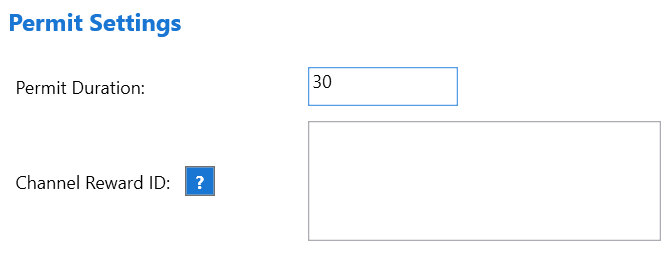
• !permit broadcaster/moderator grant time-limited rights to a user.
• VIPs & Subscribers may optionally be exempt from any moderation individually.
 Customization Options
• Define your own suspicious keywords & TLDs via commands or JSON.
• Tailor replies for deletes, timeouts, bans, warnings, permits.
• Choose bot vs. broadcaster account, text vs. /me actions.
• Update all parameters via .JSON or action arguments — no code editing needed.
 Automations & Learning
• Tracks repeated spam patterns and auto-adds new keywords/TLDs for future detection.
• Relies on APIs in various situations to check against lists that are always up-to-date.
Example:
Import Files
TwitchLinkGuard-v5.4.sb (143.7 KB)
Install TwitchLinkGuard
Step 1 - Import
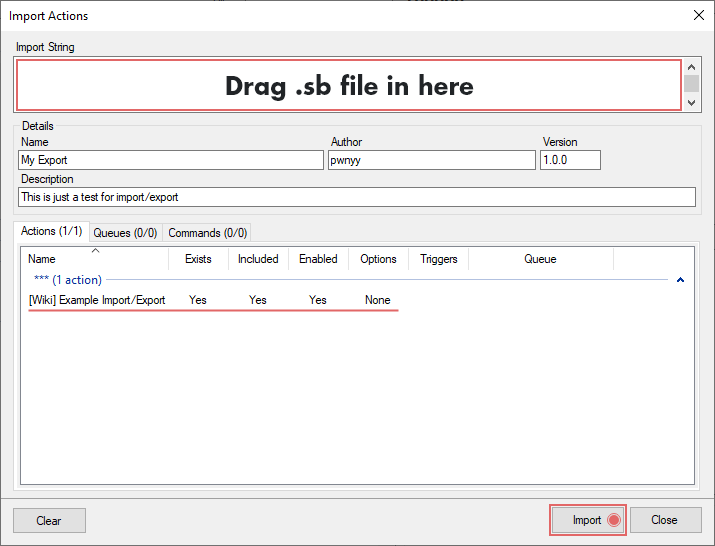
In Streamer.bot click the Import button in the top menu. Drag the .sb file into the Import String field.
Step 2 - Commands
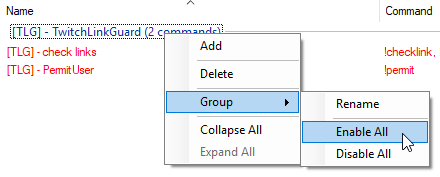
Enable the command in the Commands tab.
Step 3 - GUI
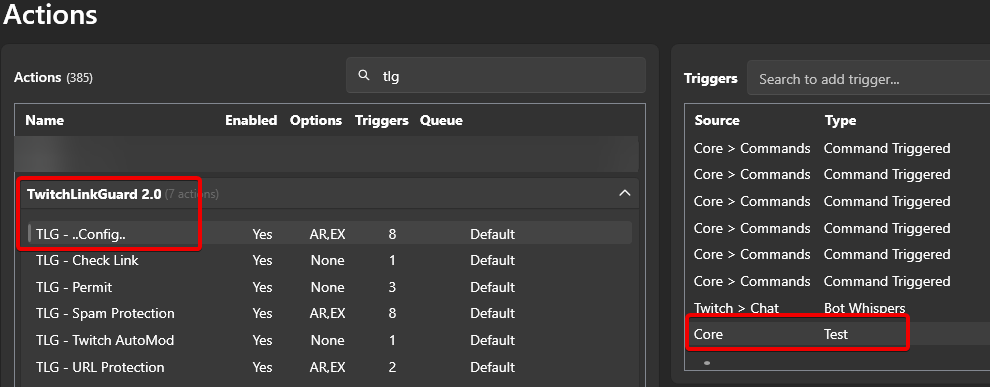
Right-Click on the Test trigger to open up the GUI.
Step 4 - Actions
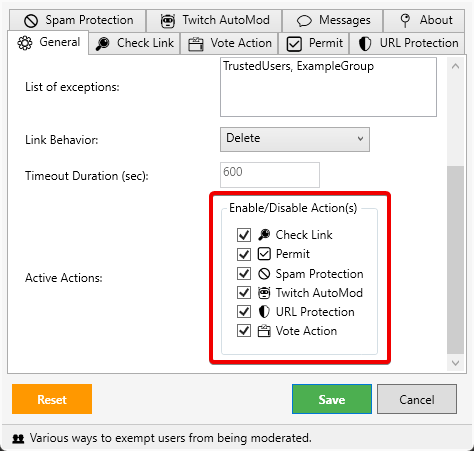
There are several actions you can use or disable. Disabled action tabs become invisible in both the tabs and the message tab.
| Command | Example | Description | Info |
|---|---|---|---|
| !AddWhitelist | !AddWhitelist streamer.bot |
Adds a URL to the whitelist for everyone to use | |
| !RemoveWhitelist | !RemoveWhitelist streamer.bot |
Removes the url from the whitelist | |
| !AddBlacklist | !AddBlacklist streamer.bot |
Adds a URL to the blacklist, blocked for everyone to use | Broadcaster/Moderators exempt |
| !RemoveBlacklist | !RemoveBlacklist streamer.bot |
Removes the URL from the blacklist | |
| !ListWhitelist | !ListWhitelist | Shows a list of all whitelisted URLs | |
| !ListBlacklist | !ListBlacklist | Shows a list of all blacklisted URLs | URLs are slightly obfuscated with asterisks to prevent users from clicking on them |
Commands can be used in chat or as whisper
Step 6 - Editing Messages (Optional)
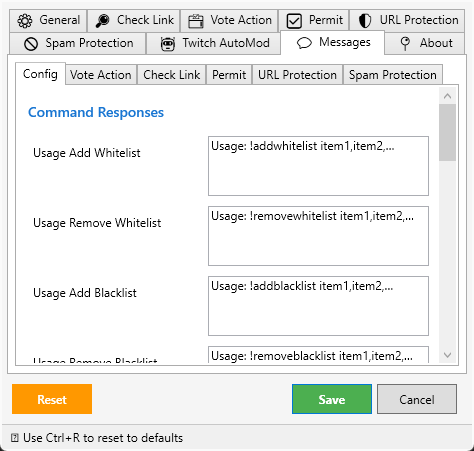
If you’re updating from an older version, you should backup your files because the new version config might differ from the old one, as well as the messages.json
You might want to edit, translate or correct some messages, you can find them in the Messages tab sorted by action.
Optionally, you can edit the messages.json directly.
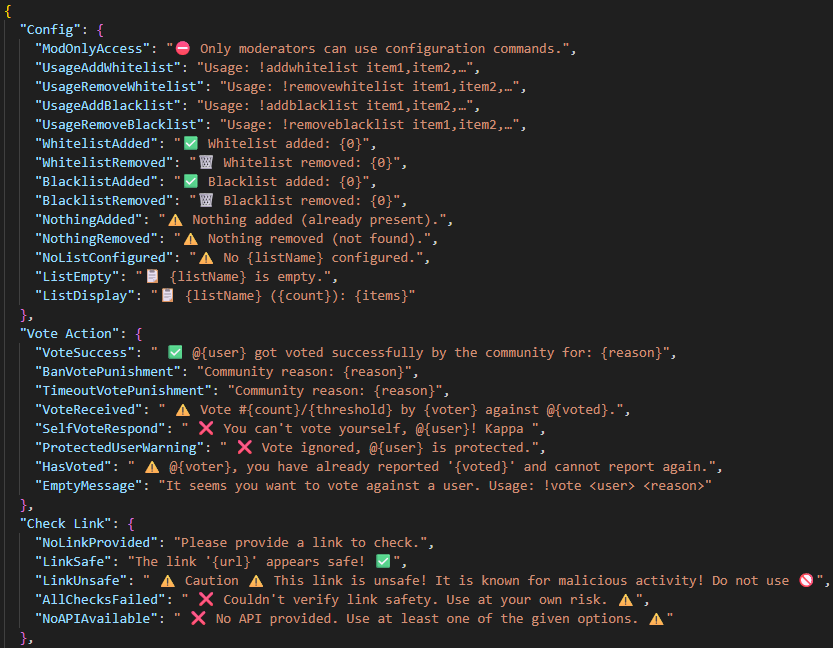
Explanations to Features
Check Link
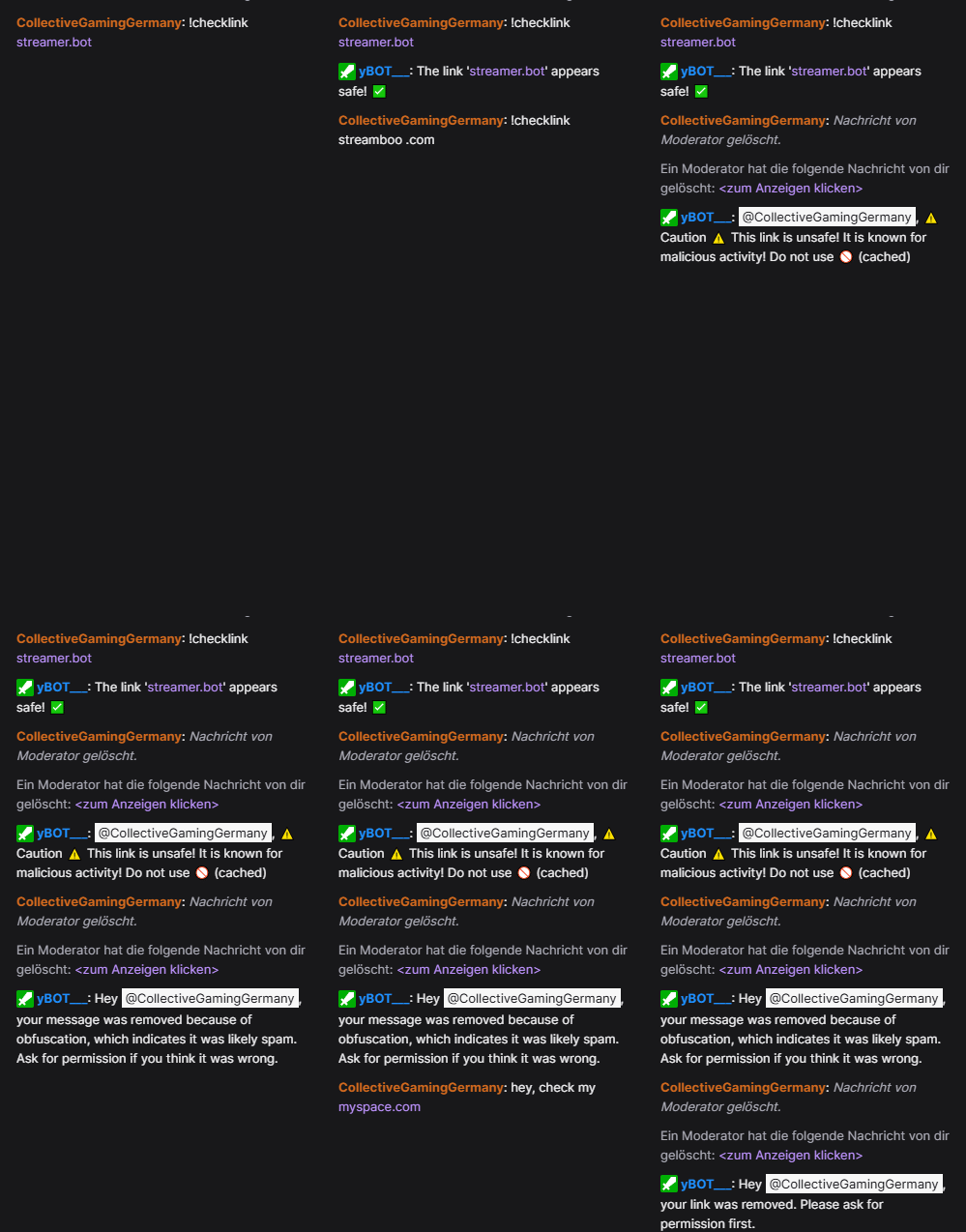
Sometimes you will receive links from users you would trust at first glance, but you’re unsure if this link is really “safe” to use. Now you can check those links!
Installation
All you need is either a VirusTotal or URLscan.io account.
Replace << YOUR-API-KEY >> with your free api key.
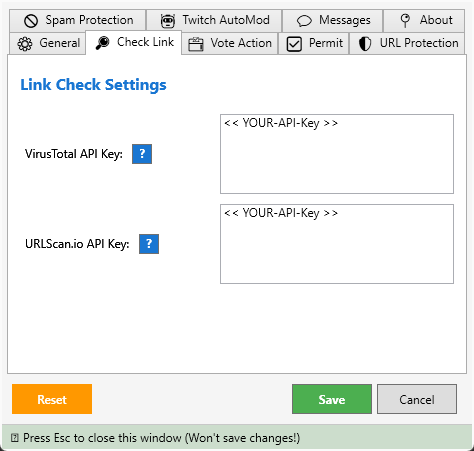
| Command | Example | Description | Info |
|---|---|---|---|
| !checklink | !checklink streamer.bot |
Now executes the URL against the API database if known malicious behavior is registered | May delete the original message if the URL was found malicious |
Vote Action
Are you doing a Subathon stream and your mods are already asleep? Your VIPs, subs or anyone can work together to vote unwanted users out of your chat! After enough votes, a user will be punished!
Installation
All you need to do is, editing the settings to fit your needs
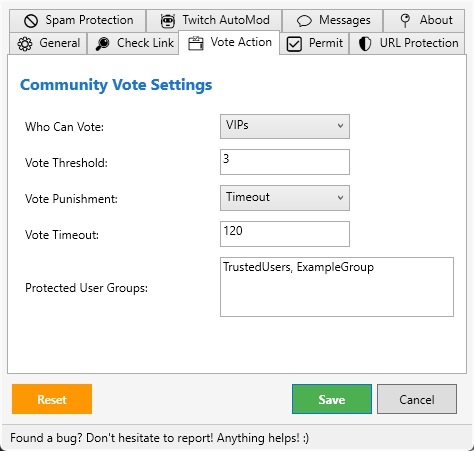
| Command | Example | Description | Info |
|---|---|---|---|
| !vote targetUser reason | !vote @RndDude Too Random |
Start counting votes against the user. When the threshold is reached, the user gets either a timeout or ban | The reason is added to the final execution message |
Each report is unique, one user cannot report another multiple times in order to punish someone quickly. With default settings, three different users must report the same user within an hour in order to successfully initiate further actions.
Link Permit
Allow one or more users to post links for a set amount of time. You can revoke permission from any or all users at any time
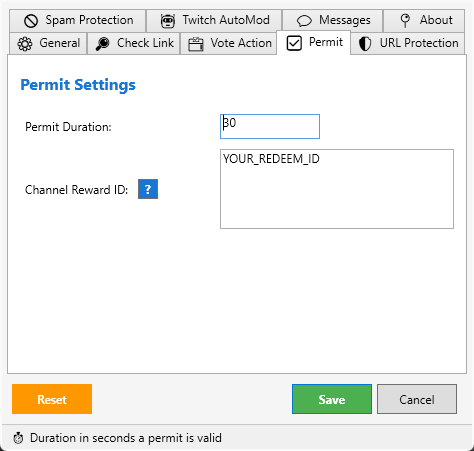
| Command | Example | Description | Info |
|---|---|---|---|
| !permit userName | !report @RndDude |
The user now has x seconds time to post a link | A message will be send the permit ends |
Edit the time labels in the Messages > Permit tab.
Edit after the =: minute=min;minutes=mins;second=sec;seconds=sec
Spam Protection
Detecting spam like cheap viewers..., "Your chat is snoring @broacaster…`, spam messages with voucher-codes or spam with mentioned non-existing user.
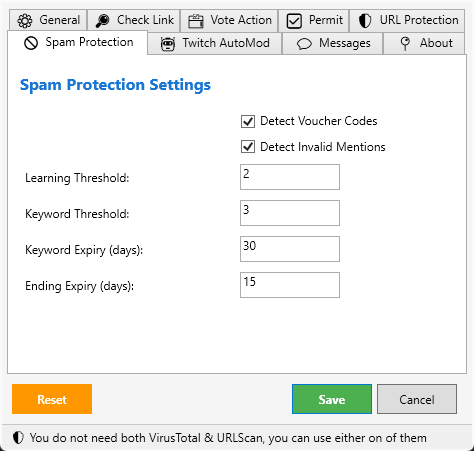
This action automatically learn new keywords or endings to learn new spam patterns.
You can edit the spam-learned.json directly or by chat/whisper commands.
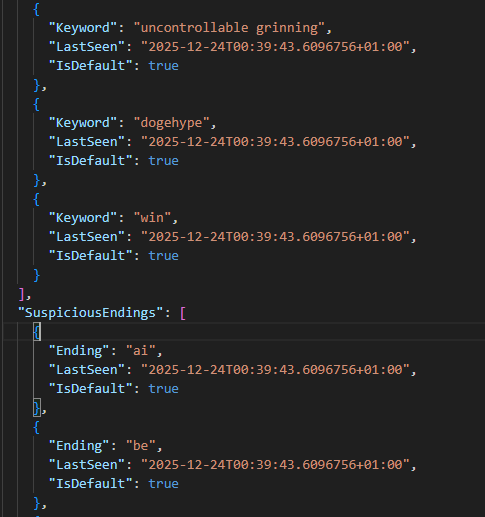
| Command | Example | Description | Info |
|---|---|---|---|
| !addkeyword | !addkeyword item |
Add a keyword to the list | Added keywords are always non-default, which means that they will expire and be removed if they are not found within a certain time frame |
| !removekeyword | !removekeyword item |
Remove keyword from the list | |
| !listkeywords | !listkeywords |
Shows the list of added keywords | Shows the number of default and non-default keywords |
| !addending | !addending item |
Add a ending to the list | Added endings are always non-default, which means that they will expire and be removed if they are not found within a certain time frame |
| !removeending | !removeending item |
Remove a ending from the list | |
| !listendings | !listendings |
Shows the list of added endings | Shows the number of default and non-default endings |
| !addvoucher | !addvoucher item |
Add a voucher to the list | The voucher pattern must at least look like xxx-xxx to be a valid input |
| !removevoucher | !removevoucher item |
Remove voucher from the list | |
| !listvoucher | !listvoucher |
Shows the list of added voucher | If the list is bigger then 5, it only shows 5 voucher-patterns in chat. For the full list, use the whisper comman. |
URL Protection & TwitchWarn
All links will be deleted in general if not whitelisted, the user is exempt or has an elevated role. Typos like Hey.you or How...are you will be ignored.
A ban/timout may happen if the detected URL is an exact match of a known malicious source.
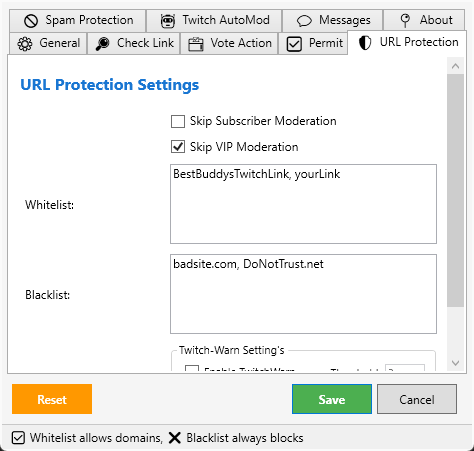
Twitch Warn
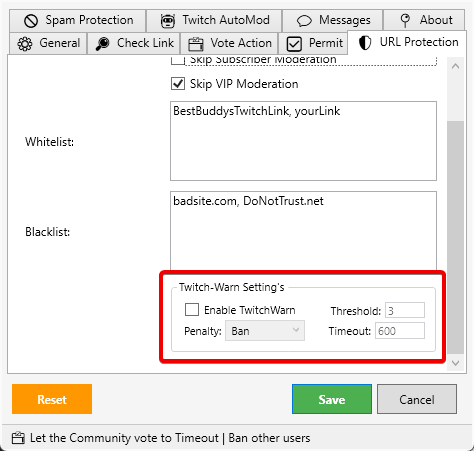
Can be optionally enabled and ensures the user needs to accept your message before participate in your chat again.
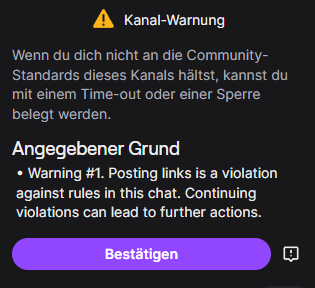
You can setup a 3-Strikes rule which means, a user violating three times will receive a ban or timeout on the fourth violation and also get a special warn message beforehand.
TwitchWarns are tracked in the users Mod-Actions tab. Every moderator in your channel can see the users history in the mod-panel.
Twitch AutoMod
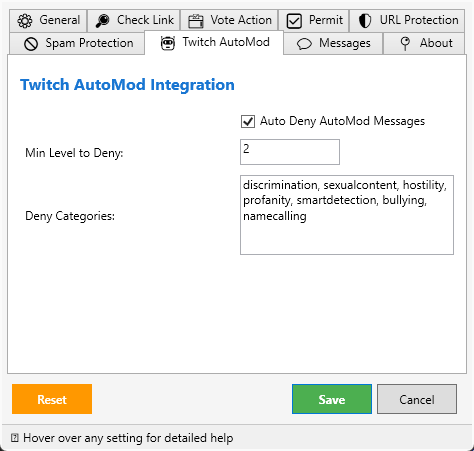
Set Smart Detection to the first option in the dropdown menu and do not change anything else. TLG can automatically deny all incoming held back messages. (Default settings recommended for catching typical spam)
Disclaimer:
This script has been developed with input from the community and support by AI. If you run into any problems, let me know!
Changelogs:
Hotfix Update 5.4
Spam Protectionupdated some regex.Spam Protectionnow handles new spam like “Ai Viewe𝗿𝘀 𝗌𝗍𝗋ea𝗆𝖻𝗈𝗈 .cᴏᴍ”.- Fixed:
Spam Protectionsended either the full voucher code or a broken system.string message if a new voucher-code was learned. Both fixed.
Pls let me know about issues 
Older Changelogs
Hotfix v5.3
- Forgot to add some role checks in some locations, because of the quirks whisper messages come along from twitch.
- Removed some debug test logs.
v5.2
Config
- Added a checkbox for
Monitor Restricted Usersagain.
Spam Protection
- Updated regex for spaced out urls.
- Spam learning and expiry messages are now always send, regardless of
Silent Modesettings. - Fixed a lot of typos.
- Added a blocking queue to run things smoother.
- Added the same notification for whisper to normal chat messages, when users trying to use commands in chat.
Twitch AutoMod
- Enabled and reworked the
Suspicious User Messagesection and is now fully working and removing messages from restricted/monitored user. (These messages aren’t visible for normal users anyway, but some broadcaster might want to remove them to protect their staff.) - Added a blocking queue to run things smoother.
URL Protection
- Any url containing the broadcaster name is now on
Whitelistby default. - Added a blocking queue to run things smoother.
v5.1
Config
- Restructured some Messages child tabs.
- Added
Voucher Expiry (days)to theSpam Protectiontab. - Added
Spam Learningas checkbox to disable learning optionally. Spam Protectiongot a lot more customizable messages.- In the
Permittab ofMessages,Time labelis now split and handled separated to be less confusing and easier to edit. - Added a new customizable message in the
Permittab.
Permit
- Permit message now shows the permit time more detailed.
... is now allowed to send links for 1 min 20 sec. - Added a automatic reminder message. Send for permits running longer then
60 secondsand remind the user30 secondsbefore the permit is running out.
Spam Protection
- Non-voucher words won’t get removed anymore. Thanks @theofficialdoko
- Expanded the
Spam Learningalgorithm to include voucher patterns. - You can
Add,Removevoucher patterns and display aList. - Updated logging.
v5
Config
- Added a
GUIfor easier handling of all settings. - All
messagesare now editable via the GUI. - Updated/Changed some messages to reflect newest changes.
- The GUI allows you to easily enable/disable actions you don’t want to use.
- Unified link behavior handling. You can now choose between
delete, ban, or timeoutfor most actions. - Removed
tlg_prefix from all settings, as it’s no longer needed. - Removed
twitchlinkguardfromconfig.jsonandmessages.json. - Renamed
twitchlinkguard-learned.jsontolearned-spam.json. - Changes now happen in real-time. Caching is less intrusive or blocking.
tlg_SpamTypeis now a temporary global variable, as persistence is not needed.- Added features to add, remove, and list
whitelistedandblacklisteditems. - Listed
blacklisteditems are obfuscated with asterisks in chat to prevent users from clicking on them. - Broadcaster/Moderator can now add/remove items to the white-/blacklist not only by chat but also by sending a whisper the the bot account.
Check Link
- Changed exemption handling for other actions by using the tlg_SpamType
checkLink. - Removed
URLHausapi, as it proved unreliable. - Expanded logs to provide more insight into decision-making.
Permit
- Fixed: Rare case a user couldn’t be permitted.
- You can now permit multiple users one after another.
- Permits can be rewoked either for all or a specific user.
Spam Protection
- Fixed: Voucher codes were too broad and triggered on URLs with many
-. Thanks to @theofficialdoko . - Fixed: Whitelist now handles even ridiculously long and complex links. Thanks to @theofficialdoko .
- Fixed:
LearningThresholdnow correctly counts deleted messages before adding new learned words, reducing false positives. - Fixed: Stopwords are not ignored more strictly.
- Fixed: Learned words previously not recognized due to diacritics.
- Fixed: Rare cases where unknown words were not learned.
- Enhanced logging to show step-by-step message processing.
- Added features to
add, remove, and listkeywords and endings via chat. - Broadcaster/Moderator can now add/remove items to the Keywords-/Endingslist not only by chat but also by sending a whisper the the bot account.
Twitch AutoMod
- Temporarily removed the
Suspicious User Messagefeature, as it couldn’t be made to work despite correct API handling. - Updated handling for
categoriesanddeny levels.
URL Protection - Fixed:
Whitelistwas not fully ignored during checks. - Updated
tlg_SpamTypehandling.
Vote Action
- Removed
moderatorsfrom the voting logic. - Added
Everyoneas a new voting option. - Fixed:
Subs+Vipswas not handled correctly. - Fixed: Rare cases where
VoteThresholdwas unreliable. - Vote punishments still handled separately via
banortimeout.
Backup your files before import the update!
Skip Shared Chat is still WIP. Pls let me know if it works or not, as i can’t really test it myself and only had 2 streamers who said it does work.
If you can give me a hint about Suspicious User Message to get it to work, also pls let me know!
And yeah i don’t know if i want to keep the statusbar or not, that’s why some tooltips are there and on mouse hover, let me know what you think
Let me know if there are issues
Update v4.1
TLG - Spam Protection
- Fixed: Keywords won’t get deleted if they are the only content of a message, as it should be.
- Fixed: Rare case messages with obfuscated links won’t get deleted.
- Fixed: Flagged messages that mention the broadcaster now get rightfully deleted.
Thanks for pointing out @logicmotion
Update contains the full Setup for continuity reasons.
Update v4
TLG - ..Config..- Regrouped and renamed some sub-actions.
- Updated both .JSON output files.
- Removed arguments
tlg_Blacklistandtlg_Whitelist. BlacklistandWhitelistnow have commands to add/remove them on the fly from chat.- Removed caching and init handling to minimize workload for sb. (noticable faster startup)
- Added
tlg_SpamActionin theSpam Preventiongroup. - Added
tlg_SpamTimeoutDurationin theSpam Preventiongroup. - Added
tlg_MinAutoModLevelToDenyin theTwitch AutoModgroup. - Added a new Group:
Messages. No need to edit the .json anymore. Messagescontains all messages from all actions grouped in samenamed sub-groups.- Added
tlg_EmptyMessageas a new editable message if!voteis used without specifying a user.
TLG - Check Link- Renamed
TLG - Link CheckertoTLG - Check Link. - Removed the
URLHausapi as it caused unnecessary issues and didn’t worked reliable anyways. VirusTotalandurlscan.ionow work independently and simultaniously.!checklinkis now an actual command.
- Renamed
TLG - Permit- Minor Bugfixes.
- Fixed: Typos.
TLG - Spam Prevention- Regrouped some sub-actions by usage.
- Machine Learning was completely redone and does now work reliabe and check any message deleted by the bot for new keywords.
- Respond in Chat if new keywords are added to
twitchlinkguard-learned.json. - Better and more detailed logging.
tlg_SpamActionnow let you decide how the script should handle spam. You can either usedelete,ban,timeouttlg_SpamTimeoutDurationis used if you usetimeoutto handle spam.
TLG - Twitch AutoMod- Reworked handling of messages held back by Twitch AutoMod feature.
- With
tlg_MinAutoModLevelToDenyyou can define the strictness ofTLG - Twitch AutoModwithout going through all the options in Twitch. Just activate the Twitch AutoMod (“Only possible Messages”) and the sript does the rest based on your settings. tlg_MinAutoModLevelToDenyranges from 0-4.
0 = OFF (you need to manualy revise held messages)
1 = Profanity, discrimination, aggression
2 = SmartDetection (twitch default) mainly for Spam but will filter out other categories aswell.
3&4 = Cover more/all categories and very strict.- Removed categories will be ignored from script if a message with said categorie is deteced.
tlg_AutoDenyCategoriescontains currently all known Twitch AutoMod categories and can be edited. Normally no need to touch.
TLG - URL Protection- Fixed: Timeout and Ban logic for infected URLs reworked.
- Fixed:
Twitch Warnlogic now correctly punish users after exceeding the warn threshold.
TLG - Vote Action- Fixed: Removed more typos and wrong naming.
- Minor Bugfixes.
General Changes- All chat messages should now be clearer.
- All actions have more detailed logs.
- Fixed: All actions now correctly use
UseBotandSendAction. - Only necessary arguments will be populated as persistend global variable.
- SharedChat should be now more reliable detected.
v3.8
- Fix: Whitelist now handles single words correctly and only allows them if they are a valid part of an URL and not just part of the message. Which made it to a wordlist filter and that wasn’t the intention.
- Fix: Rare case where the blacklist caused messages from moderators got deleted.
- Revised all comments in all actions to match them to the dark mode of sb 1.x for better readability.
- Revised some comments to give a clearer explanation of functions
%tlg_SkipSharedChat%should now properly skip messages from shared chat ifTrue. Still considered as WIP as some edge cases aren’t yet properly tested- Renamed likely all actions to clearify their use.
- Updated Log handles.
Backup your .json before you import!
Regular Updates
v3.5
- Added a new action:
TLG - AutoMod & Restricted- With this action, you can now handle messages held back by twitch automod. Define the minimum level on which the automod should deny messages automatically and for which categories.
- WIP - Filters messages from users that are already flagged as “restricted” by twitch.
- Updated
TLG - ..Config..to v2.3- Updated triggers.
- Added a new group
AutoMod & Restrictedfor the new action including new args.tlg_AutoDenyMessagesto disable the feature if there are issues.tlg_RestricedUserssame as above.tlg_MinAutoModLevelToDenydefine the minimum level the automod should deny any message automaticallytlg_AutoDenyCategoriesdefine the category that are used. (There exist already a wide range of categories, you may want to edit the value first)
- Added new args to the
twitchlinkguard-config.json.
- Updated
TLG - ObfuscationWatchto v2.5- Now also detect if a mentioned user exist but is not present.
- Log spam should be now at a minimum in general for TLG
Hotfixes
** Hotfix - ObfuscationWatch v2.7 & TwitchWarn v2.3**
- Fixed: whitelist and blacklist handle now correctly example entries like:
"https://www.somesite.com", "YourStreamName", "twitch.tv/userName/clip/*"again.
This is just a hotfix for TLG - ObfuscationWatch and TLG - TwitchLinkGuard & TwitchWarn . The hotfix import does not contain anything else. Please see the Opener for the full script.
Regular Updates
v3.4
- Merged Hotfix for TLG - ReportRadar v3.1 seen in sb discord thread.
- Merged Hotfix for TLG - ObfuscationWatch v2.4 seen in sb discord thread.
Hotfixes
Hotfix for TLG - ObfuscationWatch v2.4
- Fixed a typo that caused that the spam indicator stopped working
- Updated default keywords of
TLG - ObfuscationWatchto tackle newest spam messages. - Word boundary regex is now more strict to scan for exact words and exclude variations.
- Removed an unused trigger.
Hotfix for TLG - ReportRadar v3.1
- Changed some parameters for
TLG - ReportRadar. Also stopped throwing helix errors in log for no reason. - Edited the Log-Level on some cases to stop spamming the logs for no reason.
v3.3
- Merged Hotfix Hotfix for TLG - ..Config.. v2.2 seen in sb discord thread.
- Updated default keywords of
TLG - ObfuscationWatchto tackle newest spam messages. - Fixed a bug in
TLG - ObfuscationWatchthat prevented using commands to add/remove keywords or endings. - Changed some parameters for
TLG - ReportRadar. Also stopped throwing helix errors in log for no reason. - Updated some messages in the messages.json to be more eye catching.
Bugfix for TLG - ..Config.. v.2.1
- Implemented a timer to run Init() every 60 seconds. That should be enough to cover all occasions.
Hotfixes include only the minimal, targeted configuration changes and omit any extra actions or commands. See TwitchLinkGuard-v2.0.sb for the full project import.
v3.2
- You can now use commands to add objects to the whitelist and blacklist in chat with
!addwhitelist,!addblacklist,!removewhitelist,!removeblacklist. Therefore, the corresponding args are now disabled by default since they would always overwrite everything done with the commands. - Merged Hotfix v3.1 which brought UTF-8 language support.
- Updated some comments
- Changed a trigger of
TLG - ..Config..to a timer, that should also prevent some unnecessary errors in the logs.
Latest available hotfix only contains the updated TLG - ..Config.. action.
TLG - ..Config..now uses UTF-8 to fully support the use of messages in kyrillic, latin, ascii languages.
Thx for pointing it out @tomo92s
This is just a hotfix for TLG - ..Config.. the hotfix import does not contain anything else. Please see the Opener for the full script.
v3
TLG- ..Config..
- Added a new argument
tlg_NoRespondMessagesthat makes it easier if you don’t want to have any respond message for ban/timeout/message delete in general. - Added a new message
tlg_HasReportedthat tells the user if the target is already reported. - Added a new message
tlg_SomeoneElsePermitthat tells the user who has already a permit. - Generally, unified the look of the args to be consistent upper case after “tlg_”
- Removed some left over code from previous versions.
- Renamed the JSONS groups to reflect the name change of the actions
TLG - Link Permit
- Reworked the script to now use actual commands.
- Available commands:
!permit <user>same as before but is handled in the commands tab of sb.!endpermitforces to end the current running permit.
TLG - LinkInspector
- Reworked the script to now use actual commands.
- Available commands:
!checklink <url>functionality stays the same.
TLG - ReportRadar
- Reworked the script to now use additionally commands.
- Available commands:
!report <user1,user2,...>functionality stays the same.
TLG - TwitchLinkGuard & TwitchWarn
- Added a logic that should prevent the script from deleting messages containing emojis in rare occasions
v2
- All arguments are now bundled by the new action
TLG -..Config..and are grouped according to the actions to which they belong.Blacklist&Whitelistnow work reliably, even with special characters like german umlauts.- All args feed JSONs which are then populated as GlobalVars in Streamer.bot, accessible by all actions. This step was taken in the hope of making it easier to implement a GUI later.
- A timestamp was added to the JSONs to track when they were last updated by the script. (Manual inputs are not considered by the timestamp)
- For
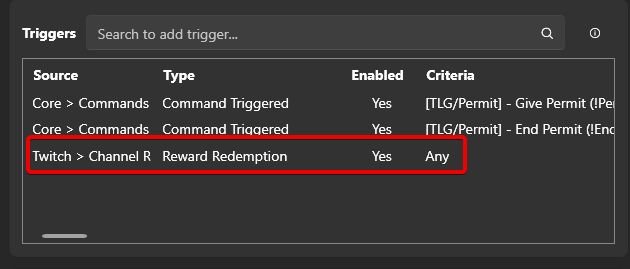
Link Permit, a Channel Points function was added that allows users to grant themselves a permit for a specified period.
 However, since I still cannot test Channel Points myself, this is considered “WIP-Testing”
 LinkInspectorgives you the ability to check any URL (including obfuscated ones) for its legitimacy at any time.LinkInspectorclearly warns you about dangerous links and removes them.- Three different API providers (including VirusTotal) are used, with attention to making it easy for you to get your own API key for free. (Links to the APIs are in the sub-action comments). Of course, you don’t have to use all three, but VirusTotal is recommended.
ObfuscationWatchis the action separated and reintroduced from the main script that filters typical Twitch spam (e.g., “cheap viewers..”, “your chat is snoring…”).- Args were introduced to disable specific features if problems occur.
ObfuscationWatchindependently learns new keywords and endings if spam patterns slightly change and also removes keywords/endings if they have not appeared for a defined period, keeping the list as current as possible.- Commands were introduced allowing moderators to manually add or remove keywords/endings.
- Available commands:
!addkeyword <argument>,!addending <argument>,!removekeyword <argument>,!removeending <argument>. - Keywords/Endings added this way are automatically “non-default” and are removed if they are no longer seen according to the
...ExpirationsDaysvalue. - Successfully tested multiple times: Messages like “cheap viewers…” that Twitch already blocks were successfully deleted.
- Community Report Users was renamed to
ReportRadar.- It is now possible to specify a single group as
reportRolesto restrict this function to specific users. - Moderators, broadcasters, and the bot should now reliably not be able to report each other or be reported by others.
- It is now possible to specify a single group as
- Main Script was renamed to
TwitchLinkGuard & TwitchWarn.- Public lists are used to scan URLs for potential danger; if a link is an exact match from a list, the corresponding user is proactively timed out or banned according to the settings.
- All exceptions as well as whitelist/blacklist were bundled in the group
Exempt & Enforce for Actionsin the actionTLG -..Config... - This Modular approach now makes a
Lightversion obsolete, just disable what you don’t want to use without breaking anything. Only the actionTLG -..Config..itself must stay active. - Possibly more that I forgot to remember.
Hot- & Bugfixes separately followed after releasing TLG 2.0 v2 in discord are already implemented in this release here.


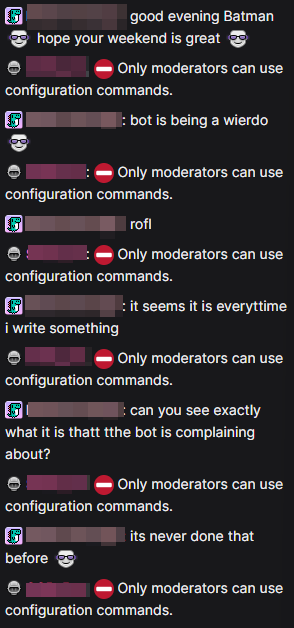
 Only moderators can use configuration commands.” after every message a user sends, no matter what the message says.