Description
Using this extension you can now run a Subathon on your stream easily. Each Twitch Subscription, Re-Subscription, and Gift Sub will add time to the timer
Import Code
subathonCountdownTimer_v2.0.2_free.sb (19.8 KB)
Installation
- Download the .sb import code
- In Streamer.bot, open the
Import Dialog - Open the folder where you saved the import code and drag and drop the .sb file into the
Import Stringbox
- Click
Import

Configuration
Streamer.bot Configuration
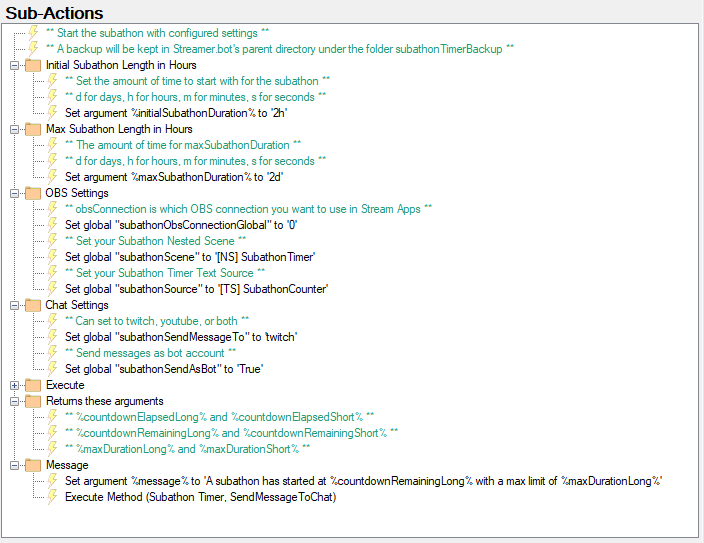
Subathon Configuration and Start
Any of the Set Argument subactions that require a duration can use the following syntax:
d for days, h for hours, m for minutes, s for seconds
Examples: 5d4h3m, 1h30m, 5m, 1h
| Name | Description | Example |
|---|---|---|
| initialSubathonDuration | Set to how long you want to start your stream | 3h |
| maxSubathonDuration | Set to how long you want the limit of your subathon to be | 2d |
| subathonObsConnectionGlobal | Set to the zero-indexed connection number found in Stream Apps > OBS |
0 |
| subathonScene | Set to the name of your nested ncene that will house the text source for the timer | [NS] SubathonTimer |
| subathonSource | Set to the name of your text source that will display the countdown timer | [TS] SubathonCounter |
| subathonSendMessageTo | Set to which platform you want to send to. twitch, youtube, or both |
twitch |
| subathonSendAsBot | Set to true if you want to use your bot account to send messages. False, otherwise | True |
Message Configuration
- Most actions will be able to have a customized chat message
- Each action will show which arguments are available
- The following arguments are available with all actions that have message customization available:
| Argument Name | Format |
|---|---|
| %countdownElapsedLong% | x days x hours x minutes |
| %countdownElapsedShort% | x days 00:00:00 |
| %countdownRemainingLong% | x days x hours x minutes |
| %countdownRemainingShort% | x days 00:00:00 |
| %maxDurationLong% | x days x hours x minutes |
| %maxDurationShort% | x days 00:00:00 |
OBS Configuration
Source Copy Import
- If you have the Source Copy OBS Plugin installed, you can use the following file to import the scene with default names
subathonScene.json (2.2 KB)
Manual Scene/Source Creation
- Create a scene and name it what you named it in the Streamer.bot action.
[NS] SubathonTimerby default (NS is short for nested scene) - In that newly created scene, create a text source with what you named it in the Streamer.bot action.
[TS] SubathonCounterby default (TS is short for text source)
- Feel free to format the font, style, and transform however you like. For best results, use a mono-space font and align to the right
- When the timer is running, it will automatically update the text source with the time left in the subathon
- You may add this nested scene into any other scenes as a source. For more information: watch this video: Nutty explains OBS Nested Scenes - YouTube
Twitch Sub Tier Configuration
-
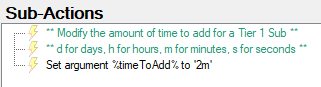
Subathon Twitch Sub Tier 1 Config
-
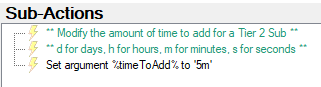
Subathon Twitch Sub Tier 2 Config
-
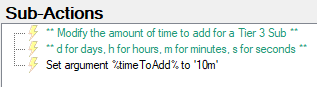
Subathon Twitch Sub Tier 3 Config
Usage
Commands
Imported commands are disabled by default as a security measure. Please make sure to enable the !subathonStart and !subathonResume command. The other commands will be enabled when you start the subathon.
| Command Name | Description | Note |
|---|---|---|
| !subathonStart | Start the subathon | You need to enter it twice to confirm overwriting an existing subathon |
| !subathonCancel | Cancel the subathon | You need to enter it twice to confirm overwriting an existing subathon |
| !subathonPause | Pause the subathon | |
| !subathonResume | Resume the subathon | You can resume even if you’ve restarted Streamer.bot or if it crashed |
| !subathonAdd x | Add time to the subathon | Use this format: d for days, h for hours, m for minutes, s for seconds / Examples: 5d4h3m, 1h30m, 5m, 1h |
| !subathonElapsed | Chat message to see subathon elapsed time | |
| !subathonRemaining | Chat message to see subathon remaining time | |
| !subathonProgress | Chat message to see current subathon progress |
Action Subathon Done Action will be triggered once the timer runs out.