
Classic Chat Gamble here is deprecated. Head over to Classic Chat Gamble on Github
Features:
-
Dynamic Betting

- Run the game with e.g.
!gambleand add a number of points you want to risk. If you feel risky, useall, half, quarter, third or randomif you want to test your luck! - You don’t want your viewers to use a external points setup? Enable the
Free Modein theGametab to let everyone join the fun without spending points.
- Run the game with e.g.
-
Cross-Platform Support

- Let your viewers enjoy gambling seamlessly on
Twitch, YouTube, Trovo, and Kick— all at the same time. Only tick the platforms you want; just untick the rest!
- Let your viewers enjoy gambling seamlessly on
-
Win Big or Lose All

- Every game brings the thrill of risk: random win multipliers reward big, while unlucky rolls could cost you your stake!
- Experience heart-pounding moments with a rare jackpot chance, awarding a massive payout when it’s hit. Both the probability and size of the jackpot are yours to tweak.
-
Full Customization

- Make the game yours by adjusting options like
defaultBet, winning chances, jackpot odds and even bet limits. - Clear, customizable chat messages celebrate wins, announce losses, and handle all edge cases like invalid or insufficient bets—so players always know what’s up.
- Instantly block certain groups from participating or apply user/global cooldowns to prevent spam and keep the game fair.
- A modern, tabbed settings GUI offers all the options you might want to tweak, automatic backups on each save if anything goes wrong and settings are instantly resettable.
⠀
⠀
- Make the game yours by adjusting options like
Import File
⠀
stable 1.x
ClassicChatGamble-v21.1.sb (45.1 KB)
⠀
Installation
⠀
 Prerequisite: Make sure you have a external points system or Channel Points (twitch only) to play. Play without currency by enabling
 Free Mode in the Game tab. Suggested: Currency Core - StreamUP
- Import the script file into Streamer.bot (SB).
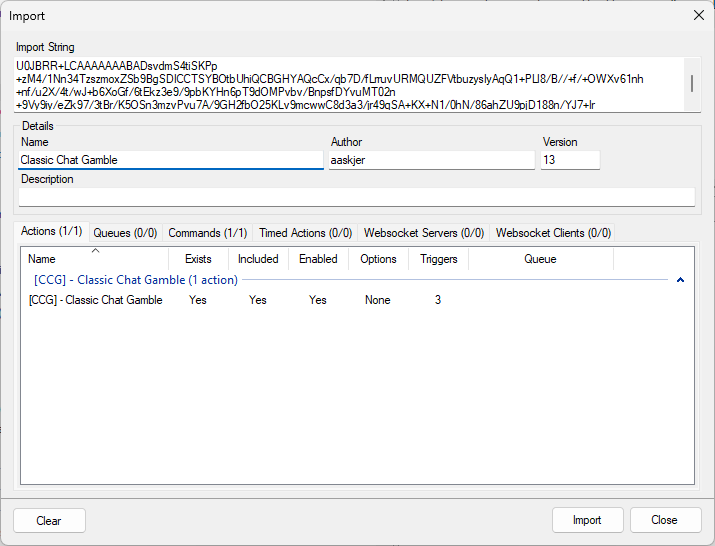
-
Enable the command.
-
Right click on the
TestTrigger to open up the settings GUI. -
Select your preferred platform(s).
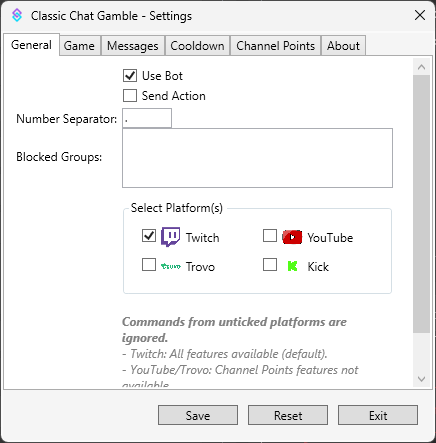
If you plan to use the game on kick.com, you need the kick.bot extension for stable 0.2.8 of streamer.bot.
⠀
Setup the game
⠀
- Adjust the game settings
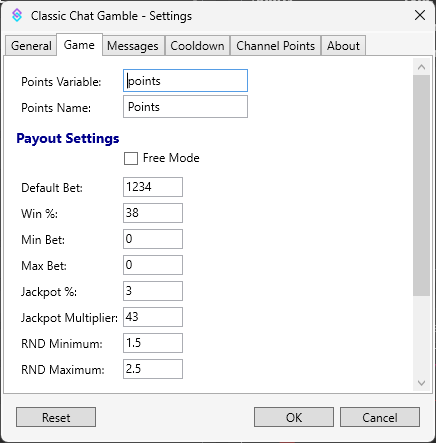
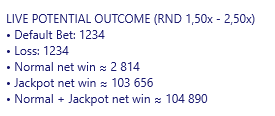
You can see the potential gamble outcome in the live example below
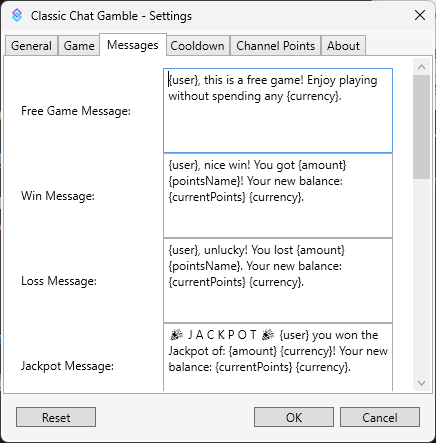
- Edit the messages (optional)
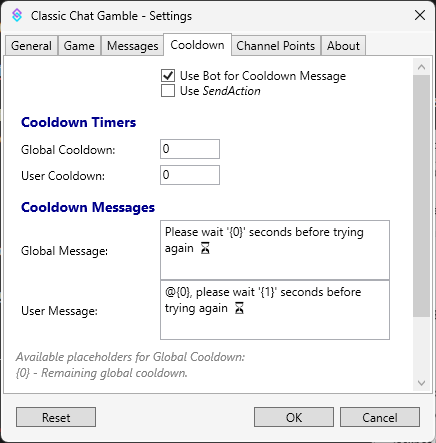
- Adjust the cooldown time (optional)
⠀
Setup Channel points (twitch only)
You need to set up a custom redeem on your twitch channel. Use the Find ID button to get your custom ID redeem string.
The command !gamble doesn’t work anymore and the game is only operated with the custom redeem.
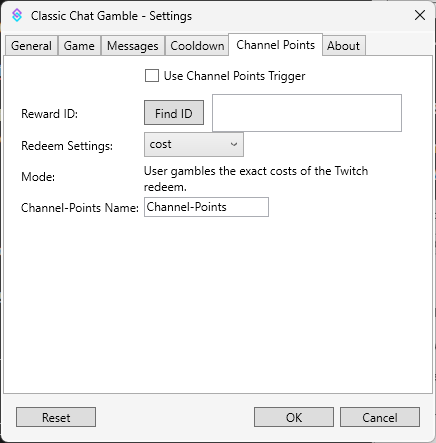
With Redeem Settings you can choose the way users can play with channel points
Channel-Points Name allows you to use an alias for
⠀
Commands
-
!gamble <amount>: Play with a specified amount of points. -
!gamble all: Go all-in and bet all your points. -
!gamble half: Bet half your total points for a safer gamble. -
!gamble quarter: Bet a quarter of all of your points. -
!gamble third: Bet a third of all of your points, for less risky people
-
!gamble random: F-it, just take the points and throw them in
⠀
Changelogs
QoL Update 21.1
- Fix: many typos fixed.
- Fix: Now uses the correct file name to save it’s cgg-settings.json.
- Updated all tooltips.
- Recolored all sub-actions to be better readable in SB 1.x
Channel Pointstab got a little redesign and should be now less confusing- Updated some default messages.
⠀
⠀
Older Changelogs
** v21**
- Channel Points Method
inputshould be fixed now. (pls test it @bitsane )
) - Many tooltips have been updated to make them easier to understand.
Win Chance,Jackpot Chancelogic got reworked a little and also accepts now decimals.Win Chance,Jackpot Chancehandling got reworked a little should be more exact now and allows a better finetuning.- Reworked the live example to show ranges for normal and jackpot win more visually.
- Default setup for
Win Chancereduced to30,Jackpot Chancereduced to1. - Size of the settings window is not fixed anymore, you can size it how you want but some settings won’t resize automatically. Also the window automatically snaps back to default size if you minimize it or go back from full view.
v20
- Adjusted some GUI positions to safe some empty space.
- Added a new Checkmark to run the game for free in
Gametab. - The GUI remembers your
Default Betif you uncheckFree Gameeven after reloading the GUI. - Removed some now unused lines.
v19
-
Playing on
Trovowork reliable again. -
Cooldown messages now are sent to the correct platform again.
-
SendActionandUseBotin theCooldowntab now do what they’re supposed to do.
v17
-
Added
Rnd Minimum&Rnd Maximumwhich was hardcoded before, it directly affects the calculation of potential outcome and should be handled with care. Also, it’s still a range, the outcome can never be mathematically exact. -
Rearanged the Live Example calculcation and renamed it
-
The example calculation now also shows the potential outcome if someone hits the jackpot + win but it might be still a little off. Mathing is hard today :blobsweat:
-
Updated some platform logos and some visuals
This Update is alpha only
Let me know about issues